Claude se poora cartoon kaise banaye (sirf code se)
Claude Code React/SVG mein scene likhta hai, Remotion usse video banata hai. Koi image ya video AI nahi. Example hai Chhotu Haathi, aur ye wahi scene hai jo reel mein dikhaya.
sirf code se, video AI nahi 🐘
Follow @techstackbroDin se raat, ek scene
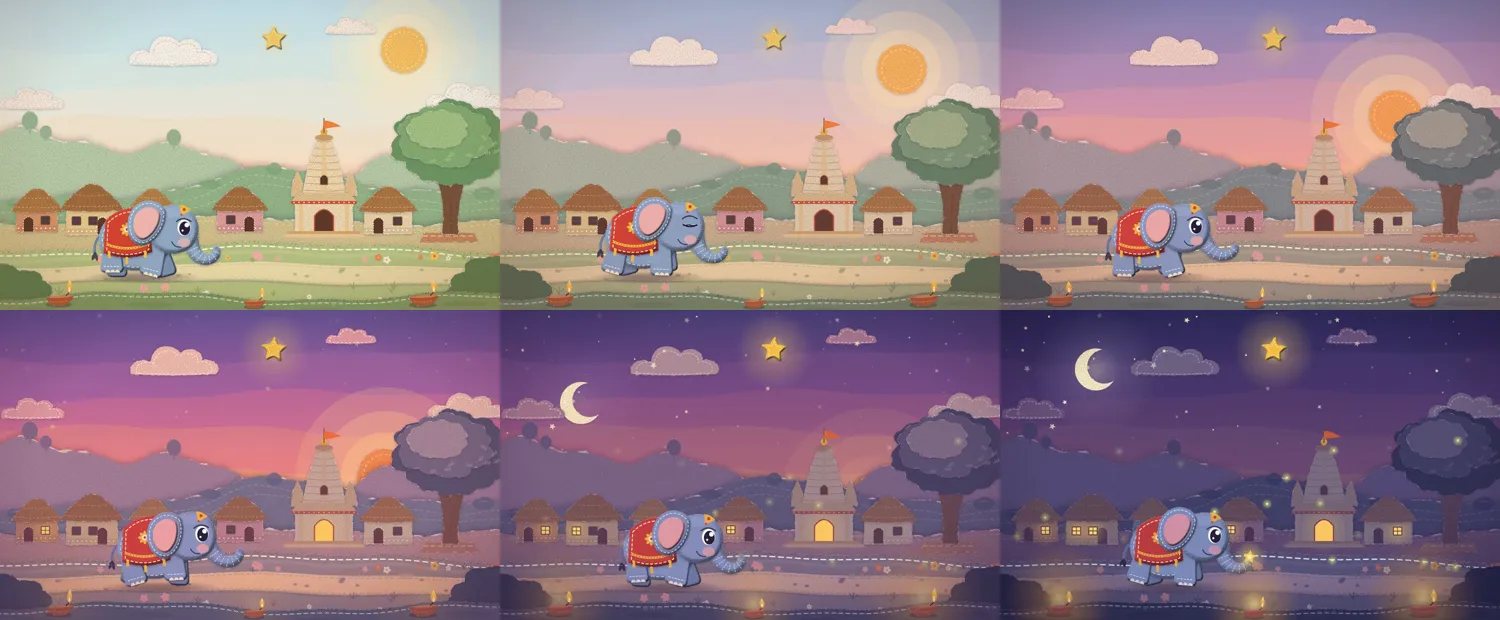
ye sab code hai: ek hi scene, night 0 se 1 tak.
Ye cheezein ready rakho
- Claude Code
- Node.js
- ffmpeg
- Narrator voice (optional): OpenAI TTS ya ElevenLabs (dono paid), ya apni awaaz.
- Music: licensed ya royalty-free hi lagao. YouTube Audio Library ek option hai.
Idea se YouTube tak
1. Folder + Remotion project
Ek khali folder banao, terminal mein ye chalao aur template mein Blank chuno:
npx create-video@latest
Phir us folder mein claude chalao.
2. Starter prompt
Ye Claude Code mein paste karo. Story ki line apni daal lena:
Is Remotion project mein ek original cartoon banao, sirf code se. Koi image ya video AI use nahi karna.

Story idea: <apni ek line ki kahani>

Pehle ye karo:
1. Story idea ko chhoti kahani mein likho, aur mujhse approve karwao.
2. Characters decide karo: naam, shakal, rang, swabhav. Kuch bhi kisi existing cartoon ya character jaisa nahi hona chahiye.
3. Scene list banao: har scene ek line mein, kya hota hai aur kitne second.

Phir har scene ko ek React + SVG component banao:
- Scene alag-alag layers mein bano (sky, hills, ground, characters, foreground), taaki layers alag se hil sakein.
- Har component ke props: `frame` aur `night` (0 = din, 1 = raat). Aur koi bhi animation `frame` se nikle, Math.random ya clock se nahi.
- Randomness seeded ho (same frame, same image), taaki render flicker na kare.
- Paper + felt wala look SVG filters se do (halka texture, stitch lines).
- Sab Remotion composition mein jodo, aur `npx remotion studio` mein dikhao.

Har scene ke baad stills render karo, unki ek contact sheet banao, khud dekho aur jo kharab lage use fix karo. Phir mujhe dikhao.
Pehle ek scene banwao, achha lage tab baaki. Contact sheet check karna isliye zaroori hai ki Claude khud galti pakad le.
3. Scene ko seedhe words mein badlo
Ab editor ki tarah bolo: make it night, elephant ko slow karo, camera haathi pe zoom karo.
night jaisa prop hai. Claude us value ko badalta ya animate karta hai, aur poora scene apne aap badal jaata hai. Image edit nahi hoti.4. Narrator + word-timed audio
Script voice mein badlo: OpenAI TTS, ElevenLabs, ya apni recording. Phir Claude se bolo ki har word ka time nikale (Whisper se) taaki captions aur scene awaaz ke saath chalein. Ye step optional hai, bina voice ke bhi cartoon chalta hai.
5. Music + SFX
Music aur sound effects sirf licensed ya royalty-free lo, aur licence ki shart padh lo. Claude se volume mix karwao: narrator upar, music neeche.
6. Lamba banao, scene by scene
Lamba cartoon ek-ek scene jodkar banta hai. Par honest baat: scenes badhne pe rendering time aur review dono tezi se badhte hain. Pehle 2 se 3 minute ka banao.
7. Render + YouTube upload
npx remotion render
Upload se pehle neeche YouTube ke rules zaroor padho.
Asli scene, apne project mein
Reel wala Chhotu Haathi scene, ek standalone React/SVG file (ChhotuScene.tsx) ke roop mein. Saath mein chhota Remotion demo, README aur MIT licence.
3 main props:
| prop | kya karta hai |
|---|---|
night | 0 = din, 0.5 = shaam, 1 = raat |
explode | 0 = flat scene, 1 = layers depth mein alag |
camera | { x, y, zoom }: kahan zoom karna hai |
Hum ne zip ko naye Remotion Blank project mein khud chalaya: still render hui. README mein steps hain.
YouTube ke rules
- Bacchon ke liye hai toh "made for kids" set karna zaroori hai. Is setting pe kuch features restricted ya unavailable ho jaate hain: comments, notification bell, personalized ads, end screens/cards, save to playlist/watch later, Miniplayer. YouTube Help
- Monetization: mass-produced ya repetitive content eligible nahi hota. YouTube ke apne examples mein hain "templated storylines", "characters are put in the same situation over and over again with the same outcome", aur "AI-generated content made with generic or unoriginal templates". Isliye apni kahani banao, har video mein alag, aur asli mehnat dikhao. YouTube Help
- AI label: clearly non-realistic ya animated content ke liye disclosure zaroori nahi hai. Realistic content ke liye hai. YouTube phir bhi khud label laga sakta hai. YouTube Help
- Copyright: kisi existing character ki copy mat banao.
Reel mein ek channel (@guipaulinooo ke reel ke mutabik) ke 60k views aur 3k comments ki baat thi. Hum wo channel dhoondh ya verify nahi kar paaye, isliye ye number unka hai, hamara nahi.
Links
AI se video kaise banaye
Ye guide AI se video kaise banaye series ka hissa hai. Poori series yahan hai:
Poora video setup chahiye? Part 1 se shuru karo.
follow karo @techstackbro 👀