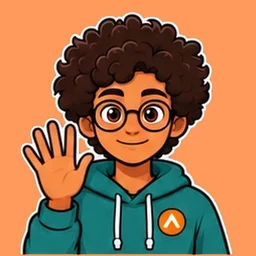
Claude Code se viral 2D reels: poora setup
Reel mein promise kiya tha, ye raha: Claude Code ka setup, mera exact prompt, aur free voice clone ka poora setup. Copy karo, paste karo, reel banao.
Animator nahi chahiye. Bas laptop aur thoda sabar 🙂
AI se video kaise banaye
Ye guide part 1 ka hai. Pehle reel dekho, phir yahan se step by step karo.
- 1Poora setup: Claude Code + exact prompt + free voice clonetum yahan ho
- 2Apna 2D character kaise banaye
- 3Animation kaise kaam karta hai (code se video)
- 4Captions perfectly sync kaise hote hain
- 5Ek reel ka asli kharcha, aur free mein kaise banayejaldi aa raha
Kya chahiye
| Cheez | Kyun | Cost |
|---|---|---|
| Claude Code | Saara code, scenes, animation likhta hai | Claude Pro/Max plan |
| Node.js 20+ | Remotion chalane ke liye | free |
| Python 3.11/3.12 | Voice clone scripts | free |
| ffmpeg | Audio clean, speed, loudness | free |
| Voice | GPT voice (paid) ya free clone (VoxCPM2 / Chatterbox) | paid ya free |
Mac (M1 ya naya) ya NVIDIA GPU wala PC best hai. Free voice models CPU pe bhi chalte hain, par bahut slow.
brew install node [email protected] ffmpeg
Windows pe: nodejs.org, python.org se install karo, aur ffmpeg ke liye winget install ffmpeg.
Claude Code install karo
curl -fsSL https://claude.ai/install.sh | bash
Windows ya baaki options: code.claude.com/docs. Install ke baad ek khaali folder banao aur wahan Claude Code start karo:
mkdir my-reels && cd my-reels
claude
Pehli baar ye login maangega. Apne Claude account se login karo. Bas, ab tumhare paas ek developer hai jo terminal mein baitha hai.
Master prompt: reel factory banao
Ye prompt ek baar chalana hai. Ye Claude Code se poora "reel factory" banwata hai: tumhara apna character, captions, cards, render script, aur ek skill file jisme saare rules save ho jaate hain. Uske baad har reel ke liye bas ek line bolni hai.
Brackets [ ] wali cheezein apne hisaab se badlo. Apna khud ka character aur style banao, copy nahi: wahi tumhara brand banega.
Create a Remotion 4 project for vertical explainer reels (1080x1920, 30fps).

MY STYLE (fill these in)
- Character: [describe YOUR character: what it is (person, animal, robot, object), look, colours, outfit]
- Where it sits on screen: [e.g. bottom centre / right side / full body in the middle]
- Expressions: [list 3 to 5 you want]
- Captions: [e.g. big bold subtitles in the centre / word-by-word pop / speech bubble]
- Colours and font: [your background, 2 or 3 accent colours, one font]
Keep all colours in one theme file so I can change the look later.

WHAT TO BUILD
1. The character, drawn in SVG code (no images), with the expressions above. Its mouth moves with the voice loudness, and it blinks.
2. Captions synced word by word to the voice-over, in my caption style.
3. Reusable visual blocks: titles, cards, big numbers that count up, icons. Each pops in when the voice says the matching word.
4. An end card with my handle [@yourhandle] and a follow prompt.
5. A cover image for each reel.

TIMING
Everything is timed to words in the voice-over. Write a script that takes the voice file, gets word timestamps with Whisper, and also saves the loudness per frame for the mouth. Scenes should say "show this when word N is spoken".

RULES
Text never overlaps the character or captions. Something new moves or appears every 2 to 3 seconds. Keep reels under 60 seconds.

RENDER
One command renders the reel MP4, the cover, and a contact sheet of frames so you can check the layout yourself.

Build a demo reel about [TOPIC] with a placeholder voice, render it, check the contact sheet and fix anything that overlaps. Then write everything you learned into a skill file at .claude/skills/reels/SKILL.md, so next time I can just say "make a reel about X" and you follow the same steps.
Voice: apni awaaz clone karo, free
Pehle apni awaaz record karo
- 10 se 20 second, shaant kamra, phone mic bhi chalega.
- Usi style mein bolo jaise reel mein bolna hai: Hinglish, energetic.
- Save karo as
me.wav. Jo bola uska textme.txtmein likh lo. - Reel mein jo bulwana hai, wo
script.txtmein likho.
B · VoxCPM2 (free)
python3.12 -m venv .venv-vox
source .venv-vox/bin/activate
pip install voxcpm soundfile
import soundfile as sf
from voxcpm import VoxCPM

# Mac: device="mps", NVIDIA: device="cuda". First run downloads the model (a few GB).
model = VoxCPM.from_pretrained("openbmb/VoxCPM2", load_denoiser=False, optimize=False, device="mps")

wav = model.generate(
    text=open("script.txt").read().strip(),
    reference_wav_path="me.wav",          # your voice
    prompt_wav_path="me.wav",             # same file again
    prompt_text=open("me.txt").read().strip(),  # what you said in me.wav
    cfg_value=2.0,
    inference_timesteps=10,
)
sf.write("vo.wav", wav, model.tts_model.sample_rate)Lamba script ek saath mat do. 2 se 3 sentences ke chunks banao, har chunk alag generate karo, phir jodo. Ek chunk ajeeb aaye toh sirf wahi dobara banao.
C · Chatterbox Hindi (free)
python3.12 -m venv .venv-cb
source .venv-cb/bin/activate
pip install chatterbox-tts "setuptools<81"
import re, torch, torchaudio as ta
from huggingface_hub import hf_hub_download, snapshot_download
from chatterbox.mtl_tts import ChatterboxMultilingualTTS

# Base model files + the Hindi-tuned text model, in one folder
snapshot_download("ResembleAI/chatterbox", local_dir="cb-hi",
    allow_patterns=["ve.pt", "s3gen.pt", "conds.pt", "grapheme_mtl_merged_expanded_v1.json"])
hf_hub_download("ResembleAI/Chatterbox-Multilingual-hi", "t3_hi.safetensors", local_dir="cb-hi")

model = ChatterboxMultilingualTTS.from_local("cb-hi", "mps", t3_model="t3_hi.safetensors")  # or "cuda"

text = open("script.txt").read().strip()
parts = [s for s in re.split(r"(?<=[।.?!])\s+", text) if s]   # one sentence at a time
out = []
for i, s in enumerate(parts):
    torch.manual_seed(42 + i)
    out += [model.generate(s, language_id="hi", audio_prompt_path="me.wav",
                           exaggeration=0.5, cfg_weight=0.3).cpu(),
            torch.zeros(1, int(model.sr * 0.06))]   # tiny gap between sentences
ta.save("vo.wav", torch.cat(out, dim=1), model.sr)Install mein error aaye (jaise spacy-pkuseg build fail), toh pip uninstall spacy-pkuseg karke dobara try karo. Ya error seedha Claude Code ko paste karo, wo fix kar dega.
Series mein aage aa raha hai
Setup ho gaya. Ab har step ka alag reel aayega, uske tricks ke saath:
- Apna 2D character kaise banaye (part 2)
- Animation kaise kaam karta hai (code se video) (part 3)
- Captions perfectly sync kaise hote hain (part 4)
- Ek reel ka asli kharcha, aur free mein kaise banaye
Miss na ho, isliye follow kar lo 🔔
Sawaal
Kitna kharcha aata hai?
Claude ka plan (Pro ya Max). Voice free hai agar clone (VoxCPM2, Chatterbox) apne computer pe chalao. Paid voice (GPT, ElevenLabs) mein har reel ke kuch rupaye. Poora hisaab ek alag reel mein aa raha hai.
Coding aani chahiye?
Nahi. Code Claude Code likhta hai. Tumhe bas terminal kholna, prompt paste karna, aur result dekh ke feedback dena aana chahiye.
Ek reel mein kitna time?
Setup ek baar 1 se 2 ghante. Uske baad script ready ho toh lagbhag 15 minute mein reel.
Windows pe chalega?
Haan. Claude Code aur Remotion Windows pe chalte hain. Free voice models ke liye NVIDIA GPU ho toh device="cuda" use karo.
Reels monetise kar sakte hain?
VoxCPM2 (Apache-2.0) aur Chatterbox (MIT) commercial use allow karte hain. Remotion individuals aur chhoti teams ke liye free hai, badi company ke liye licence lagta hai: remotion.dev/license. Har tool ka licence ek baar khud padh lo.
Free voice GPT jaisi lagti hai?
Kaafi close, par perfect nahi. Chatterbox Hindi words saaf bolta hai, VoxCPM2 English words better. Dono try karo, apne kaan se decide karo.
Sab links ek jagah
- Claude Code: code.claude.com/docs
- Remotion: remotion.dev/docs
- VoxCPM2: github.com/OpenBMB/VoxCPM
- Chatterbox: github.com/resemble-ai/chatterbox
- Chatterbox Hindi model: huggingface.co/ResembleAI/Chatterbox-Multilingual-hi
- Voicebox app: github.com/jamiepine/voicebox
Ye "AI se video kaise banaye" series ka part 1 hai. Har step ka alag reel aa raha hai.
follow karo @techstackbro 👀