Claude aur Three.js se 3D video kaise banaye
Character, desk, light, camera: sab code. Blender nahi khola, image ya video AI use nahi kiya. Claude ne 5 second ki video banayi, aur laptop ne 38 second mein render kar di.
har baal, har light, har camera: code 🧊
Follow @techstackbroYe bana
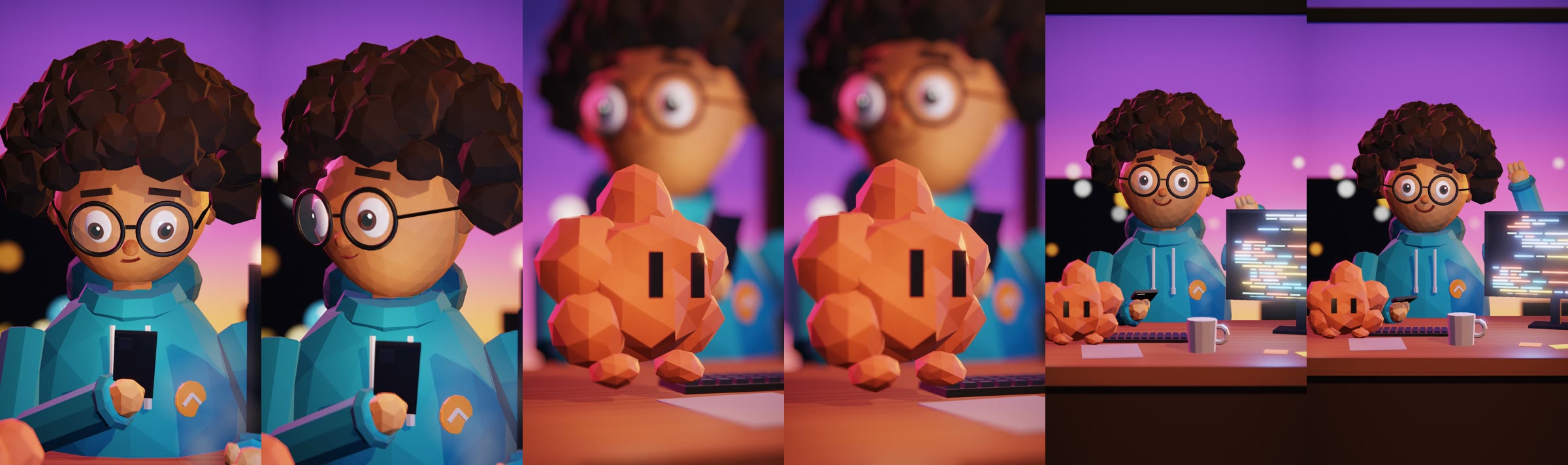
Upar 540p preview hai. Asli video 1080×1920, 60 fps hai.
Ye style chal raha hai
| reel | views | likes | comments |
|---|---|---|---|
| @canwebuildthis: API samjhaya | 2.1M | 79,504 | 286 |
| @ashutoshwithclaude: job search | 811K | 36,023 | 7,291 |
Numbers 4 Nov 2026 ko check kiye. Do reels se views ki guarantee nahi milti, aur hum in creators se judey nahi hain. Hamari video apni hai, unke characters use nahi kiye.
Is build mein kya hua
| kya | kitna |
|---|---|
| Render | 300 frames, ~38 sec, Mac pe |
| Poora kaam | ~10.5 min, folder banane se final file tak |
| Fix rounds | 5. Ye ek prompt ka result nahi hai. |
| Model | Claude Opus 5.5, Claude Code mein |
| Video | 5 sec, 1080×1920, 60 fps |
| Code | 462 lines. 0 image files, 0 image ya video AI. |
| Audio | Music aur SFX code se bane. Voiceover nahi hai. |
Khud banao
Pehle setup
Claude Code, Node.js, Google Chrome aur ffmpeg install kar lo. Phir ek khali folder mein claude chalao.
1. Claude ko scene batao
Kaun hai, kahan baitha hai, kya karta hai. Character wali line mein apna description daalo:
Make a 5 second vertical 3D video with Three.js: 1080x1920, 60 fps. Your own original characters.

Scene: a low-poly cartoon character [describe hair, glasses, clothes] scrolling a phone at a desk at dusk. A small orange buddy hops on the desk. Behind them, a big window with a purple-to-orange sky and blurred city lights.

Three shots with hard cuts: close-up on the character, close-up on the buddy with the character blurred behind, then a wide shot where the character waves.

Look: flat-shaded low-poly shapes, soft shadows, warm key light, pink rim light, depth of field, bloom, vignette, ACES tone mapping.

Rules: every frame must be a pure function of its frame number. No images, no image or video AI. Render frame by frame in headless Chrome with puppeteer-core and pipe to ffmpeg into out/desk.mp4. Extract stills, look at them yourself, and fix problems before you finish.
2. Claude Three.js mein likhta hai, tum sudhaarte ho
Model, light, camera, acting: sab code mein. Galat lage toh seedha bolo. Hamare build mein ye fixes lage:
Camera peeche karo, baal frame se kat rahe hain.
Aankhen chhoti karo, aur unhe sir ke andar se bahar laao.
Face pe light kam karo, bloom jal raha hai.
Wave wala haath monitor ke peeche chhup raha hai, bahar laao.
Chashme ki arm hawa mein hai, frame se kaan tak jodo.
3. Laptop render karta hai
Har frame Chrome mein banta hai, aur ffmpeg unhe video mein jodta hai. Pehle stills dekho, phir full render karo. Har frame apne number se tay hota hai, isliye dobara render karne pe same video aati hai.
Awaaz chahiye? Captions sync yahan seekho. Bolte characters ke liye mouth sync alag se banana padega.
Poora project, apne computer pe
Models, light, acting aur camera scene.js mein. Depth of field aur bloom post.js mein. Rendering render.mjs mein.
npm install
npm run still
npm run render
Hum ne zip extract karke 3 stills render karke check kiya. Zip mein ek generic character hai, demo video wala mera avatar isme nahi hai. Usko apne character se badal lo. Music dobara banana ho toh audio.py ko Python aur numpy chahiye.
Limits, seedhi baat
- Ye 5 second ka demo hai. Lambi video mein zyada shots, zyada time aur zyada tokens lagenge.
- Low-poly style pe achha chalta hai. Realistic skin, kapde ya complex rigging ke liye Blender aaj bhi behtar hai.
- Render time machine pe depend karta hai. Hamare 38 second is Mac pe aaye. Purane laptop pe zyada lagega.
- Bolne wale characters alag kaam hai. Is video mein voiceover aur mouth sync nahi hai.
- Kisi ka character copy mat karo. Style se seekho, character apna rakho.
- Output har baar alag hoga, same prompt pe bhi. Views ki koi guarantee nahi.
Links
AI se video kaise banaye
Ye guide AI se video kaise banaye series ka hissa hai. Poori series yahan hai:
Poora video setup chahiye? Part 1 se shuru karo.
follow karo @techstackbro 👀